- Welcome to PixelPost.

Recent posts
#11
➜ Webgarden ❀ / ☆ avatar central! ☆
Last post by cinni - Apr 10, 2023, 11:24 PMI started this thread originally in the Yesterweb forums on Tuesday May 10, 2:05pm 2022 :p Since it's now going defunct, here are those links that have been shared! ^^

100x100 avatars by neskaya.net

anime avatars by swordian.com

some avatars that i've archived

templates & 2004 avatars by nightmarefantasmic!
please feel free to share more links below!!
100x100 avatars by neskaya.net
anime avatars by swordian.com
some avatars that i've archived
templates & 2004 avatars by nightmarefantasmic!
please feel free to share more links below!!
#12
➜ Webgarden ❀ / Re: Gif Gallery。.:*☆
Last post by Karithina - Apr 07, 2023, 08:43 PMHere's a couple 88x31 buttons I've made:


#13
➜ Watering Hole 🗨 / Re: Introduce yourself!
Last post by Karithina - Apr 07, 2023, 08:33 PMName: Karithina, Tenjin.
Pronouns: they/them.
Website: 4o4.au.
Furcadia? My main is Tenjin.
Fun Fact: I can curl my tongue and flare my nostrils but I CANNOT tie a cherry stem STILL.
Pronouns: they/them.
Website: 4o4.au.
Furcadia? My main is Tenjin.
Fun Fact: I can curl my tongue and flare my nostrils but I CANNOT tie a cherry stem STILL.
#14
➜ Comment Box ✎ / Comment Box
Last post by cinni - Apr 07, 2023, 03:12 PMWelcome to PixelPost! This forum is still fairly new, so please excuse the mess. :>
Got any questions, comments, suggestions, concerns? Leave them here! vvv
Got any questions, comments, suggestions, concerns? Leave them here! vvv
#15
➜ Petz Cafe ☆彡 / Getting started with Petz!
Last post by Trisquel - Apr 07, 2023, 01:00 AMWelcome to the Petz Cafe!
Petz is a series of games for the PC originally released in 1995 by PF Magic. It's a simple little pet simulator where you can adopt puppies and kittens. You can feed, play with, and dress up your petz to make sure they stay happy.
Despite being such an old game, it's actually very easy to find and get these games up and running on a modern machine! This page will serve as a guide on how to get the game running!
Important note for Linux users!!
Petz is very easy to get running in wine, but there's a glitch in wine that makes the game think your adopted petz are corrupted after you close the game and reopen. I don't know if there's a fix but I'll update this page if there is. I recommend using a windows xp virtual machine if you are using linux. I don't use macos so I'm not sure if the glitch exists there.
Obtaining the Game!
Downloads for the petz games can be found here. You'll also need Petza from here in order to make the game run good and add functionality. Petz 4 is the most popular version of the game but you're free to choose what version you want.
Installing on Windows
When installing, do NOT install it to the default program files folder. People recommend the Documents folder but I've found that anywhere except the program files folder is fine. If you're installing on XP, the program files folder works fine.
After the game is installed, launch the Petza installer and pick where your exe installed, easy peasy!
If the game isn't working, you may need to turn on compatibility mode. To do this, right click the exe of your game and go into the properties menu, there should be a setting to enable compatibility mode.
The gameplay is extremely straight foward, this is a kids game after all! You can adopt a pet from the adoption center, you can pet them, pick them up, toss them across the room, whatever you want! It's also fun to watch your petz run around and see how they respond to other petz and their environment.
The Virtualization Route
Virtual machine's are a lot of fun. For those who don't know, virtualization is pretty much running another computer inside your computer. I recommend doing this route if you are running into issues on your main machine or if you're running on linux or macos. Also I would do this if you have a well specced machine because you're literally running 2 computers in one. I'm gonna be writing this assuming you are a complete beginner and have never used vms before.
First make sure virtualization settings are enabled in your BIOS. Every computer is different so you'll have to look up how to enter BIOS (its usually the esc or the f keys at your computer boot screen when you turn it on), every BIOS labels the virtualization settings differently too. Once you enable the setting, save and reboot like normal.
Now you can install your vm! I'll be using VirtualBox in this guide. The download for it is at their official site here. (It's also available on linux package managers) You'll also need an .iso of windows xp. I don't want the forum getting into trouble so i won't link it, but the iso is pretty easy to find if you look up "windows xp no product key" on archive.org.
To make your vm, click the add button and set it to windows xp. It will prompt you to set the ram and disk space, just go with default settings if you're unsure, you can always edit the settings later. You don't need a lot of disk space if you're just using it for petz, the default disk size, I think its around 10 gigs, will probably be fine, but you can increase if you'd like. After setting it up it would probably prompt you to insert your iso and you'll be good to go. It will probably take about 15 minutes to install. And after that you'll boot into your os! Then you'll have to install guest additions, this is under the disc menu on the top and will enable automatic screen sizing, drag and drop files, and other useful stuff. after that, you can just drag and drop your petz installers into your vm and run them like normal!
And there you have it! Please let me know if some of the instructions are unclear or if you're having trouble! Have fun!!
note to self: maybe add screenshots!
Petz is a series of games for the PC originally released in 1995 by PF Magic. It's a simple little pet simulator where you can adopt puppies and kittens. You can feed, play with, and dress up your petz to make sure they stay happy.
Despite being such an old game, it's actually very easy to find and get these games up and running on a modern machine! This page will serve as a guide on how to get the game running!
Important note for Linux users!!
Petz is very easy to get running in wine, but there's a glitch in wine that makes the game think your adopted petz are corrupted after you close the game and reopen. I don't know if there's a fix but I'll update this page if there is. I recommend using a windows xp virtual machine if you are using linux. I don't use macos so I'm not sure if the glitch exists there.
Obtaining the Game!
Downloads for the petz games can be found here. You'll also need Petza from here in order to make the game run good and add functionality. Petz 4 is the most popular version of the game but you're free to choose what version you want.
Installing on Windows
When installing, do NOT install it to the default program files folder. People recommend the Documents folder but I've found that anywhere except the program files folder is fine. If you're installing on XP, the program files folder works fine.
After the game is installed, launch the Petza installer and pick where your exe installed, easy peasy!
If the game isn't working, you may need to turn on compatibility mode. To do this, right click the exe of your game and go into the properties menu, there should be a setting to enable compatibility mode.
The gameplay is extremely straight foward, this is a kids game after all! You can adopt a pet from the adoption center, you can pet them, pick them up, toss them across the room, whatever you want! It's also fun to watch your petz run around and see how they respond to other petz and their environment.
The Virtualization Route
Virtual machine's are a lot of fun. For those who don't know, virtualization is pretty much running another computer inside your computer. I recommend doing this route if you are running into issues on your main machine or if you're running on linux or macos. Also I would do this if you have a well specced machine because you're literally running 2 computers in one. I'm gonna be writing this assuming you are a complete beginner and have never used vms before.
First make sure virtualization settings are enabled in your BIOS. Every computer is different so you'll have to look up how to enter BIOS (its usually the esc or the f keys at your computer boot screen when you turn it on), every BIOS labels the virtualization settings differently too. Once you enable the setting, save and reboot like normal.
Now you can install your vm! I'll be using VirtualBox in this guide. The download for it is at their official site here. (It's also available on linux package managers) You'll also need an .iso of windows xp. I don't want the forum getting into trouble so i won't link it, but the iso is pretty easy to find if you look up "windows xp no product key" on archive.org.
To make your vm, click the add button and set it to windows xp. It will prompt you to set the ram and disk space, just go with default settings if you're unsure, you can always edit the settings later. You don't need a lot of disk space if you're just using it for petz, the default disk size, I think its around 10 gigs, will probably be fine, but you can increase if you'd like. After setting it up it would probably prompt you to insert your iso and you'll be good to go. It will probably take about 15 minutes to install. And after that you'll boot into your os! Then you'll have to install guest additions, this is under the disc menu on the top and will enable automatic screen sizing, drag and drop files, and other useful stuff. after that, you can just drag and drop your petz installers into your vm and run them like normal!
And there you have it! Please let me know if some of the instructions are unclear or if you're having trouble!
Have fun!!note to self: maybe add screenshots!
#16
➜ Watering Hole 🗨 / Re: Introduce yourself!
Last post by Trisquel - Apr 07, 2023, 12:07 AM┎┈┈┈┈┈┈┈୨♡୧┈┈┈┈┈┈┈┒
Name: machine_cat, Trisquel, meorm, etc...
Pronouns: they/them, ae/aer
Website: machine-cat.space
Furcadia? main: Lua Vespera
Fun Fact: uuuuhhhh... ummm,
┖┈┈┈┈┈┈┈୨♡୧┈┈┈┈┈┈┈┚
Name: machine_cat, Trisquel, meorm, etc...
Pronouns: they/them, ae/aer
Website: machine-cat.space
Furcadia? main: Lua Vespera
Fun Fact: uuuuhhhh... ummm,
┖┈┈┈┈┈┈┈୨♡୧┈┈┈┈┈┈┈┚
#17
➜ Furcadian ☾★。∙ / Furcadia 101
Last post by cinni - Apr 06, 2023, 03:01 PM
Are you new to Furcadia? Don't know what this board is all about? This is the post for you! :3
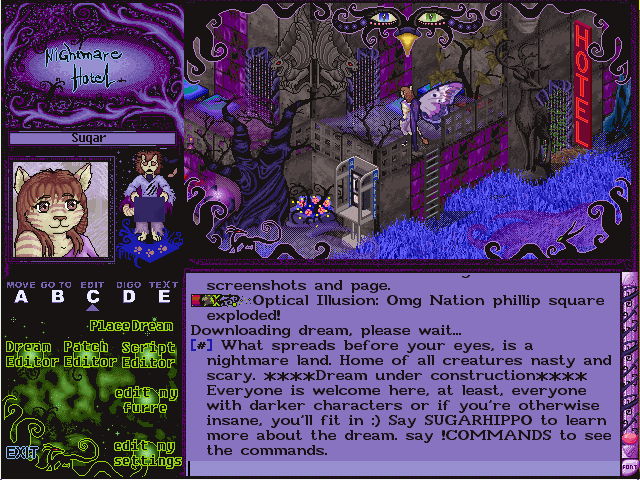
Furcadia (https://furcadia.com/) is one of the oldest running MMO's. Akin to a graphical MUD, Furcadia interactions are largely text-based with an isometric pixel world. Perfect for roleplaying or casual chatting, if you want something of a virtual world IRC this is the game for you~
Furcadia's main mechanic are user-created worlds called dreams, and there are many tools available for dreamweaving. You can even create an RPG inside of Furcadia - the level of customization is truly the most I've ever seen of any game. There are lots of beautiful dreams to explore and get immersed in. The crowd of Furcadia is not as populated as it once was, but there is still a dedicated playerbase to be found. Every three months is a user-run event called Dream Day, an all-day tour of submitted dreams that also gets livestreamed. It's super fun

Eventually I'll add a beginner guide to Furcadia here, and am happy to answer any questions. WIP!

#18
➜ Webgarden ❀ / Gif Gallery。.:*☆
Last post by cinni - Apr 06, 2023, 01:57 PM #19
➜ Furcadian ☾★。∙ / The MoodRing☾★。∙
Last post by cinni - Apr 06, 2023, 04:21 AMThe MoodRing☾★。∙
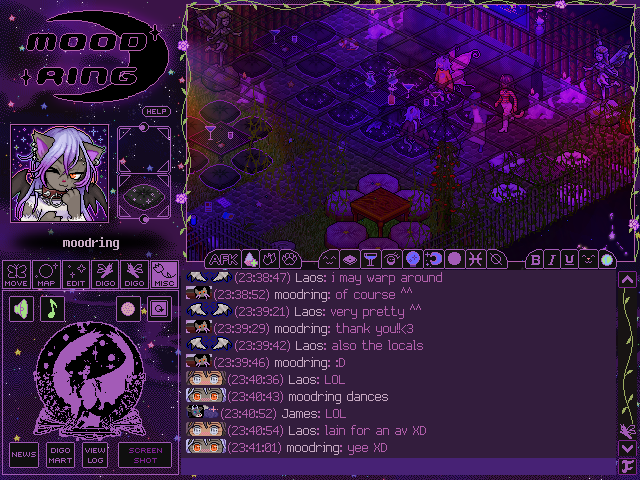
Welcome to The MoodRing☾★。∙, a zodiac themed bar located in Olde Town. :3
This dream is relatively recent, with the goal of being a chill hangout spot in an AOC environment. (Olde Town needs more love!). You can get your horoscope read & find out what zodiac sign you are! The dream keeps track of the current zodiac season and astrological happenings like the phase of the moon and if mercury is in retrograde! Check out our drink menu by clicking the drinks button or saying !menu. (to be continued)
#20
➜ Webgarden ❀ / Link Library。.:*☆
Last post by cinni - Apr 06, 2023, 04:16 AMshare cool links. let's create a directory together!
Been surfing on the internet archive and found a cool site? Share it here ^w^ Feel free to explain why & provide screenshots! For starters you can check out my directory at https://directory.cinni.net/
Been surfing on the internet archive and found a cool site? Share it here ^w^ Feel free to explain why & provide screenshots! For starters you can check out my directory at https://directory.cinni.net/